An AI chatbot for a small business website in India typically costs ₹10,000–₹40,000 to set up, plus about ₹500–₹3,000 a month for AI usage and hosting. It's worth it when you get repeated questions every day (pricing, timings, services, eligibility) and want leads captured at night; for low-traffic sites, a WhatsApp button and a good FAQ usually do the job for less.
What does an AI chatbot on a business website actually do?
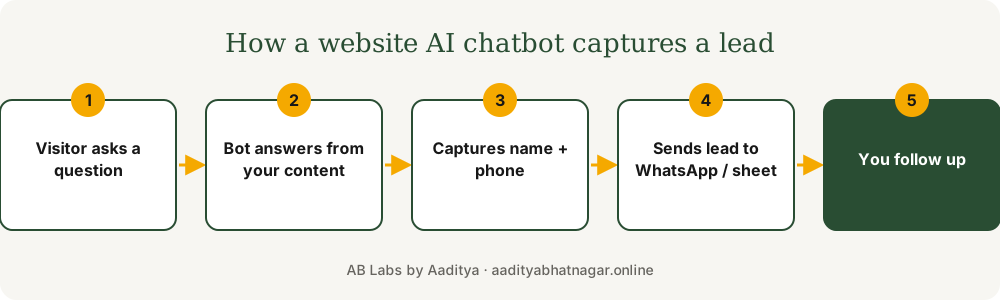
A modern AI chatbot reads your own content (services, prices, FAQs, policies) and answers visitors' questions in plain language, in English or Hindi. The useful part for a business is what happens next: it asks for a name and phone number when someone shows buying intent and sends that lead straight to you. It's different from old button-menu bots that frustrate people.
How much does an AI chatbot cost in India?
| Option | Setup | Monthly | Best for |
|---|---|---|---|
| Off-the-shelf widget (Tidio, etc.) | ₹0–₹5,000 | ₹1,500–₹6,000 subscription | Quick start, generic answers |
| Custom bot on your content | ₹10,000–₹40,000 | ₹500–₹3,000 AI + hosting | Accurate answers, leads to WhatsApp/CRM |
| Bot + booking + CRM automation | ₹35,000+ | ₹1,500–₹5,000 | Clinics, institutes, high inquiry volume |
These are typical project ranges, not fixed quotes. AI usage costs have dropped a lot, so for most small sites the monthly model bill is the smallest line item. For wider context, see how much AI automation costs a small business.
When is an AI chatbot worth it?
- You or your staff answer the same 10 questions every day.
- A lot of traffic arrives after business hours.
- Your services need a bit of explanation (courses, treatments, packages).
- You get enough visitors that even a few extra captured leads a month pays for it.
If your website gets a few hundred visits a month and questions are simple, a WhatsApp button plus a clear FAQ section converts just as well. Compare the options in AI chatbot vs human receptionist.
How do you stop a chatbot from giving wrong answers?
- Restrict it to answer only from your approved content.
- Make it say "let me connect you with the team" when unsure, instead of guessing.
- Never let it confirm prices, medical advice or bookings it can't verify.
- Review conversation logs weekly for the first month and fix gaps in your content.
What should the chatbot do with a lead?
Send it somewhere you'll act on within minutes: a WhatsApp message to your phone, a row in Google Sheets, or your CRM, with the question the visitor asked. Speed matters more than the bot itself; the reason is explained in why replying in 5 minutes wins more leads.
Want this set up for your business? I build websites and automations for clinics and small businesses across India. Tell me about your project or message me on WhatsApp for a free quote.